

Summary
How to change the details on a purchase invoice in Sage Accounting.
Description
The ability to edit an invoice depends on your VAT Scheme and whether the invoice has been included on a VAT Return.
Invoice Basis VAT Scheme? - The invoice may have been included on a VAT Return.
Cash Basis VAT Scheme? - The invoice won't be included on a VAT Return, only the payment would be.
Resolution
Edit a purchase invoice
- Go to Purchases, then Purchase Invoices.
- Find and select the invoice you wish to edit.
- Select Edit.
If a message appears saying "You can't edit this invoice....." follow the corresponding steps below. - Edit the information needed and select Save.
Edit a paid invoice >
Un-match the payment from the invoice
- From the invoice, select 1 payment located under the Amount Paid.
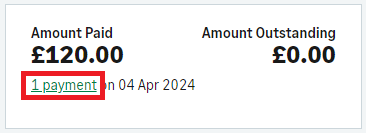
- Select the Amount next to the Supplier Payment.
- From the bottom of the Supplier Payment window, clear the checkbox for the relevant invoice and Save.
- Choose Yes to save the payment as a payment on account.
- Edit the invoice as needed and select Save.
Match a payment to the invoice
- Go to Purchases, then Purchase Invoices.
- Find the invoice and select the checkbox on the left.
- Above the list of invoices, select More, then Pay or Allocate.
- The invoice will already be selected. Select the payment you want to match.
- Make sure that Left to allocate is 0.
- Select Save.
Edit an unpaid invoice included on a VAT Return >
Edit a paid invoice included on a VAT Return >
You need to reverse the invoice and then create a new invoice with the correct details on.
Check for Draft VAT Returns
If the invoice is included in a draft VAT Return, you can delete the draft to allow you to edit the invoice.
- Go to Reporting, then VAT Returns.
- Look for any VAT Returns marked as Draft.
- If there are no drafts, go to the next section.
- Select Delete
 .
- Go back to the invoice and select Edit.
- If it still shows as being included on a VAT Return, follow the steps below.
If it doesn't, follow the steps above for Edit a paid invoice.
Un-match the payment from the invoice
- From the invoice, select 1 payment located under the Amount Paid.
- Select the Amount next to the Supplier Payment.
- From the bottom of the Supplier Payment window, clear the checkbox for the relevant invoice and Save.
- Choose Yes to save the payment as a payment on account.
- Edit the invoice as needed and select Save.
Reverse an invoice included on a VAT Return
- Go into the invoice you want to edit.
- Select Add credit note.
- The date should be the same date as the invoice.
- The rest of the credit note will automatically match the invoice.
- Select Save.
Creating the credit note reverses the invoice, and it will appear on the next VAT Return.
 Africa
 Asia
 Australia
 Canada
 France
 Kenya
 Nigeria
 Portugal
 South Africa
 Spain
 United Arab Emirates
 United Kingdom
 United States
 Germany