

Summary
How to pay off part or all of a customer or supplier invoice transaction in Sage 50 Accounts.
Description
Allocating customer or supplier invoice (SI or PI) to credit notes (SC or PC) or payment on accounts (SA or PA) will pay them off.
Resolution
How to allocate to invoices
- To allocate credit notes or payments on account, go to Customers or Suppliers.
- Select Customer receipt or Supplier payment.
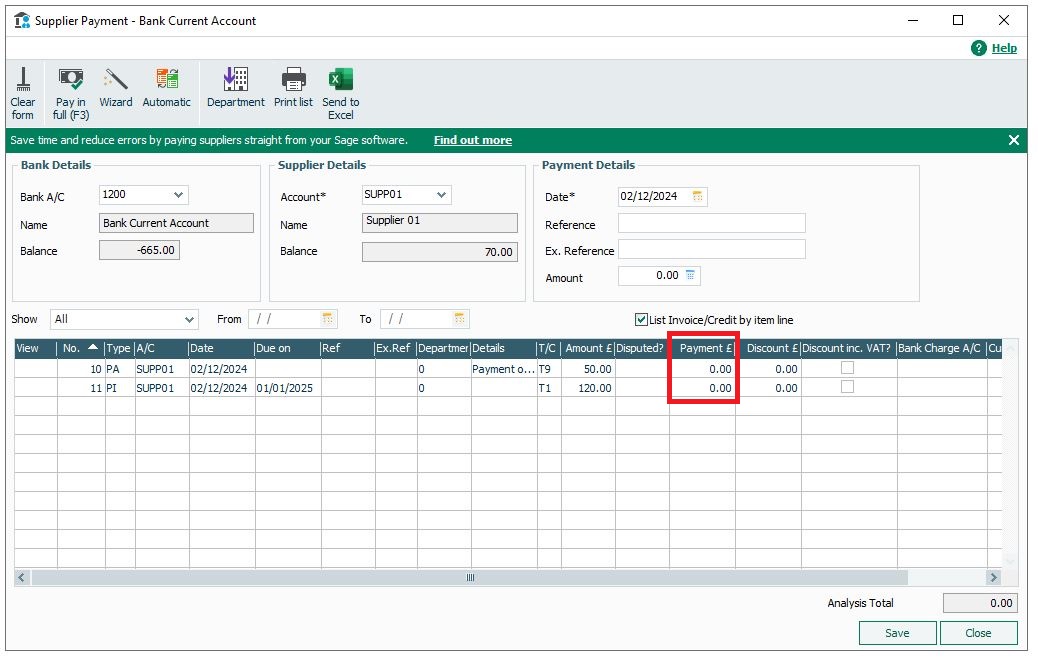
- To allocate the transactions, enter payment details in the Customer receipt or Supplier payment window as follows:
Bank A/C Choose the bank account to post the payment to. Date Enter the date for the allocation, usually the later date of the specific transactions. Payee Choose the relevant customer or supplier record from the dropdown list.
To allocate each transaction, enter the payment details as follows:
- Against the relevant credit or payment on account, select the Receipt or Payment field and enter the amount to allocate.
- To allocate the full value, press Pay in Full (F3).
- Against the relevant invoice, select the Receipt or Payment field and enter the amount to allocate.
- To allocate the full value, press Pay in Full (F3).
Upgrade your licence
Growing business? Add more companies, users, or employees to your licence with ease. Leave your details and we’ll be in touch.

 Africa
 Asia
Asia Australia
 Canada
 France
 Kenya
Kenya Nigeria
 Portugal
 South Africa
 Spain
Spain United Arab Emirates
 United Kingdom
 United States
 Germany