

Summary
Description
As your business grows, you may need to upgrade your service to include more employees. How this works depends on the type of licence you have.
Resolution
To check your subscription type
- Log in to your Payroll as normal.
- In the navigation bar, select your business name.
- Select Manage business account and Subscriptions.
You’ll see either:
Tiered employees
- Payroll 5
- Payroll 10
- Payroll 15
- Payroll 25
- Payroll 35
- Payroll 50
- Payroll 75
- Payroll 100
Per employee per month (PEPM)
- Payroll Essentials
- Payroll Standard
- Payroll Premium
Tiered employees
When you try to add an employee that exceeds your current license, you’ll get an error message. This will redirect you to your Upgrade Subscription.
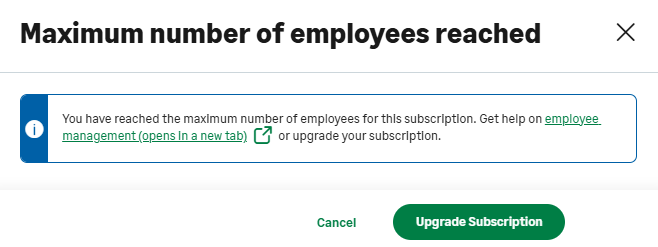
If you’ve reached your limit, you need to switch to the new PEPM model to add employees. This means you'll only pay for those who are active.
Per employee per month
This means you're already on either an Essentials, Standard or Premium subscription. You don't need to upgrade your licence to add more employees. When you create a new employee in Payroll and exceed your included allowance (5 or 10 employees), the system automatically bills you per employee.
For more information, read Changes to Sage Payroll billing.
Leavers in employee list
Sometimes, historical leavers remain on your employee list. They can stop you from adding new employees.
See our article Why is a leaver still showing?
Would you like to speak to someone about your subscription?
Ready to upgrade?
Leave us your details and we'll get back to you to discuss your options.

 Africa
 Asia
Asia Australia
 Canada
 France
 Kenya
Kenya Nigeria
 Portugal
 South Africa
 Spain
Spain United Arab Emirates
 United Kingdom
 United States
 Germany