Change your business name
Resolution
How to update your Sage subscription if the name of your business changes.
If you have a Limited (Ltd) business, you must first update the name at Companies House. After that, follow the steps below to change it on your Sage account.
If you only want to edit the contact information of your business, go to Settings, then About your Business.
If you need to change the email address linked to your subscription, read Change the email address on a subscription.
How we use your business name
You can only have one business name registered with us. If you're a Limited (Ltd) company, it should be the same one that's registered with HMRC or Companies House.
Your business name is used:
- On your subscription and agreement with us.
- By us when we invoice you.
- By HMRC, when you submit information such as a VAT return.
- On the invoices that you send to your customers.
Don't change your business name if
- You trade under a different name than the one registered with us. See How to use a 'Trading as' name.
- You're changing from a sole trader or partnership to a Limited (Ltd) business. See Change business type from a sole trader or partnership to an Ltd company.
Change your business name
The information we need from you will differ depending on your business type.
To make sure you send us the required information
Complete the form from the relevant link for your business type.
Make sure your business name has been updated at Companies House. We can only change the name of Limited companies to the same as your registered name.
The details from the completed form are included in an email and sent to your email address (as specified on the form).
Attach the required documents to this email and send it to us at [email protected].
You must send the email from the email address registered as the Business Owner on your account.
As an accountant change the name for a client
Email us at: [email protected] and make sure you include the following information:
- The client’s business name and their email address.
- Your business name.
- Your Partner Edition login email address.
How to use a 'Trading as' name
You may want a different name to appear on the invoices you send to your customers, if you use a Trading as name, for example.
We can't store more than business name, so we recommend that you use the second line on the address for your trading name.
So if your registered business name is Joe Bloggs Ltd and but your trading name is Joe Bloggs Garden Supplies
- Set up your subscription as Joe Bloggs Ltd.
- For your Business name and Trading address
From Settings, enter your trading name, Joe Bloggs Garden Supplies, on Address 1.

- Enter your trading address in the remaining boxes.
- Go to the Business Type section. Clear the Registered Address: Same as business address box.
Enter your registered address.


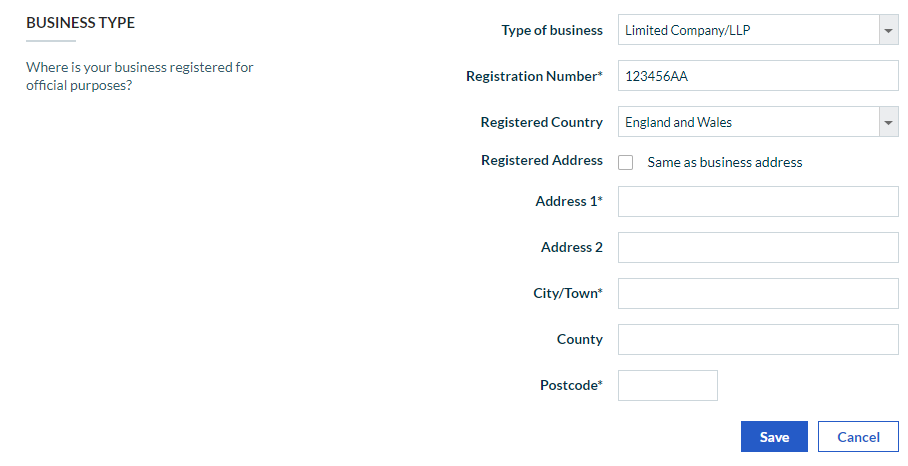
When you send invoices to your customers, your registered business name and trading as name are included

Change business type from a sole trader or partnership to an Ltd company
As your business is now a whole new entity, you'll need to set up a new subscription for your new Ltd company. As you'll have a new VAT reference number and a new PAYE reference number issued by HMRC, you'll need to set up a new account with us, using all your new details. To do this, sign up again from our website.
We recommend that you run your new and old subscriptions side by side, until you old company is dissolved.
Once you're ready to just use the new company, cancel your subscription for your old company.
For Payroll subscriptions
For Payroll you may need to account for a transfer of undertakings (TUPE) and business transfers.
Changing your company status may also affect your company’s Automatic Enrolment staging date. Therefore, before following the steps in this article you should contact The Pensions Regulator
You will also need to close your PAYE scheme with HMRC.
 TIP: It’s important that you complete your final payroll tasks in the right order and notify HMRC that your PAYE scheme has ended. You can use Payroll to close off your company’s payroll and submit the relevant information to HMRC.
- Set each employee to be a leaver on the date that the business ceases trading.
- Complete the final pay run of the business and submit the final FPS (Full Payment Submission)
- Review P11 values.
- Submit the Final Employer Payment Summary (EPS). You should select the Ceased Trading check box and enter the cessation date.
- Distribute P45’s to all employees.
TIP: If your employees are subject to a Transfer of Undertakings (TUPE) then do not distribute the P45’s to the employees.
Related content
Solution Properties
- Solution ID
- 222001000101608
- Last Modified Date
- Tue Jun 20 13:09:25 UTC 2023
- Views
- 0