Import your chart of accounts
Summary
Resolution
Apply this when you possess a set of ledger accounts you prefer over the default ones provided.
How it works
To import your ledger accounts, you must:
- Have a new Accounting business with no transactions or records
- Save your ledger accounts in a spreadsheet as a comma-separated value (CSV) format
- Use the template file provided to ensure your document contains accurate column headings and cell formats
Ledger accounts can also go by the names nominal accounts, codes, or entries in your chart of accounts.
The ledger accounts imported from the CSV file will replace all the standard ledger accounts created in Sage Accounting by default.
Import all needed ledger accounts as you can't import them again after manually creating extra ones.
Column headings and required formats
The information in your CSV file must be in the correct format and the file must have the correct headings.
When preparing your spreadsheet, use the table below to ensure that your file format is correct.
Remember that the header row in your CSV file must use the same headings as shown below.
| Column | Column Heading | Notes |
| A | NOMINAL CODE | Can contain up to 8 numbers and each code must be unique. |
| B | LEDGER NAME | Max length 200 characters. |
| C | CONTROL ACCOUNT | Ensure a valid control account name; modifying is fine, but avoid deletions.
|
| D | CATEGORY | Use one of the following categories:
|
| E | TAX RATE | Use one of the following tax rates:
|
 TIP:
TIP: Control accounts
These are special ledger accounts that we use by default for certain transactions. For example, when you create a sales invoice, we automatically update the ledger accounts for Trade Debtors and VAT.
Ensure your list of ledger accounts includes all control accounts. You can identify control accounts by special text in the CONTROL ACCOUNT column, like 2100 Trade Creditors TRADE_CREDITORS.
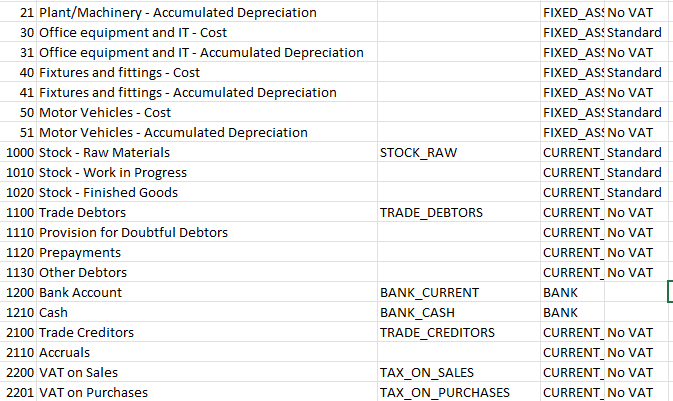
There are three ways you can do this:
- Let us create them for you using a default Nominal Code and Name. Exclude control accounts from import file; generate ledger accounts using provided codes and names
- Use your own control accounts. Include necessary text in Control Account column to indicate ledger accounts for use as control accounts
- A mixture of the above. Specify control accounts by adding text in the Control Account column and exclude any unused accounts. We will create the remaining control accounts as long as they’re not duplicate nominal codes
Adjust codes, ledger names as needed, and include correct text in control account column. For example, you use 2000 Creditors Control, instead of 2100 Trade Creditors.
Required control accounts
| Default nominal code | Default ledger name | Required Control Account text |
| 1000 | Stock | STOCK_RAW |
| 1100 | Trade Debtors | TRADE_DEBTORS |
| 1200 | Bank | BANK_CURRENT |
| 1210 | Cash | BANK_CASH |
| 2100 | Trade Creditors | TRADE_CREDITORS |
| 2000 | VAT on sales | TAX_ON_SALES |
| 2201 | VAT on purchases | TAX_ON_PURCHASES |
| 2202 | VAT liability | TAX_LIABILITY |
| 2203 | VAT allocations and adjustments | TAX_ALLOCATIONS_AND_ADJUSTMENTS |
| 2204 | VAT on sales holdings | TAX_ON_SALES_HOLDING |
| 2205 | VAT on purchase holdings | TAX_ON_PURCHASES_HOLDING |
| 2230 | Student Loan | STUDENT_LOAN |
| 2240 | Attachments | ATTACHMENTS |
| 2250 | Net Wages | NET_WAGES |
| 2260 | Pension | PENSION |
| 3100 | Profit and Loss Account | PROFIT_AND_LOSS |
| 4000 | Sales - Products | SALES_PRODUCTS |
| 4010 | Sales - Services | SALES_SERVICES |
| 4020 | Sales Discounts | SALES_DISCOUNTS |
| 4910 | Carriage on Sales | CARRIAGE_ON_SALES |
| 4900 | Other income | OTHER_INCOME |
| 5000 | Cost of Sales - Goods | COS_GOODS |
| 5010 | Purchase Discounts | PURCHASE_DISCOUNTS |
| 7000 | Employee Wages and Salaries | EMPLOYEE_COSTS |
| 7020 | Employers NI | EMPLOYERS_NIC |
| 7030 | Employer's Pension | EMPLOYERS_PENSION |
| 7050 | Other Deductions | OTHER_DEDUCTIONS |
| 7060 | Statutory Sick Pay | STATUTORY_SICK_PAY |
| 7070 | Statutory Maternity Pay | STATUTORY_MATERNITY_PAY |
| 7080 | Statutory Paternity Pay | STATUTORY_PATERNITY_PAY |
| 7090 | Statutory Adoption Pay | STATUTORY_ADOPTION_PAY |
| 7900 | Bank Charges and Interest | BANK_CHARGES_AND_INTEREST |
| 8260 | Exchange Rate Gains and Losses | EX_RATE_GAIN_LOSS |
| 9998 | Opening Balances | OPENING_BALANCES |
| 9999 | Suspense | SUSPENSE_CORRECTIONS |
Step 1: Download the CSV template file
Each CSV file contains a standard list of ledger accounts and the required columns for Nominal Code, Ledger name, Control account, Category and Tax rate.
A CSV file is a special excel spreadsheet.
Download the CSV file that is suitable for your business type.
- From Settings, then Business Settings, select Chart of Accounts.
- From the New Ledger Account dropdown arrow, select Import Accounts.
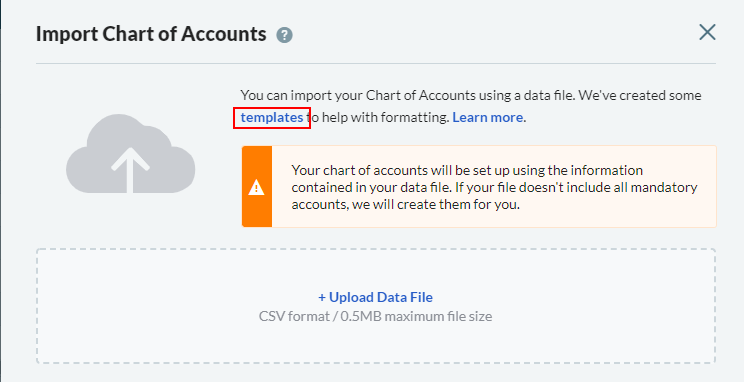
- Select the Templates link and then choose the template that matches for your business type.
Step 2: Prepare the CSV file
Step 3: Import the file
- From Settings, then Business Settings, select Chart of Accounts.
- From the New Ledger Account dropdown arrow, select Import Accounts.
- Choose the Upload Data File link.
- Browse to your CSV file and then click Open.
- Click OK.

Can't find the Import Accounts option
Common errors
If your file has not imported, we'll tell you the problems and specific rows affected.
Not a valid column heading
NOMINAL CODE must be unique
Not a number
Must be a valid category
Nominal code already taken
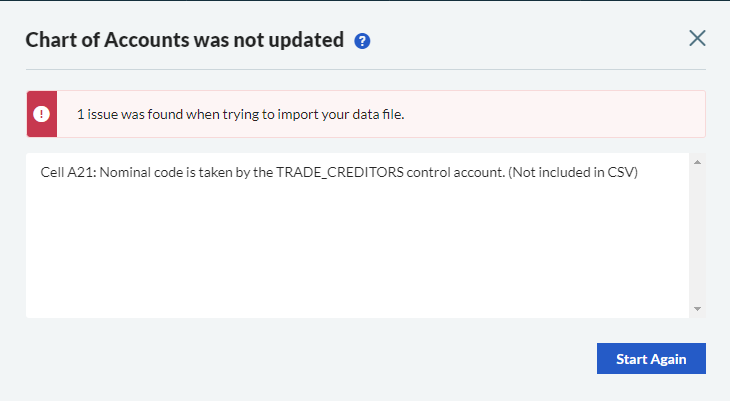
Occurs when nominal code reserved for control account's used without adding required control account text to ledger.
For example, Ledger account "2100 Trade Creditors" lacks "TRADE_CREDITORS" text in Control Account column.
To resolve this, either
- Change the nominal code used for this ledger account, or
- Complete the Control Account column with the appropriate text
Related Solutions
Solution Properties
- Solution ID
- 222001000100819
- Last Modified Date
- Thu Jan 09 15:38:44 UTC 2025
- Views
- 0