Duplicate transactions in your bank feed
Summary
Description
This most commonly occurs when you have two bank feeds and import bank transfers from both accounts.
This may also happen when your something has gone wrong with the bank fee, or when you disconnect and re-connect a bank feed.
Resolution
Duplicate bank transfers
For example, if you transfer £100 between bank A and bank B.
Bank A sends details of the transfer via bank feed. In Sage Accounting you create a bank transfer transaction from your bank feed. This updates the balance of Bank A (-100) and Bank B (+100).
Bank B also sends details of the transfer transaction. You create this in Sage Accounting as well. This duplicates the bank transfer transaction and updates the balance of each bank again Bank B (+100) and Bank A (-100).
Delete duplicate transactions
How you delete these depends on when you notice the duplicate transactions.
Discard duplicate transactions from the bank feed
This is the easiest way to discard these from imported transactions page.
If you can see the duplicated transactions in your bank feed, just discard them without processing
Click the Discard button then click Yes when prompted.

Delete duplicate transactions from the bank activity
If you only spot the duplicate after creating the transaction, then delete it from the Bank Activity.
If you have reconciled the bank account, don't worry. Apart from bank transfers, delete the transactions from your bank activity in the same way. We adjust the starting balance on your next reconciliation by the amount of the deleted transaction.
Read more about how to delete bank transactions.
You can't delete any transactions included on a submitted VAT Return. You will need to reverse these instead.
To delete a bank transaction
- From Banking, select the relevant bank account.
- From the Activity tab, select the tick box to the left the transactions you want to delete.
A toolbar now appears above the list.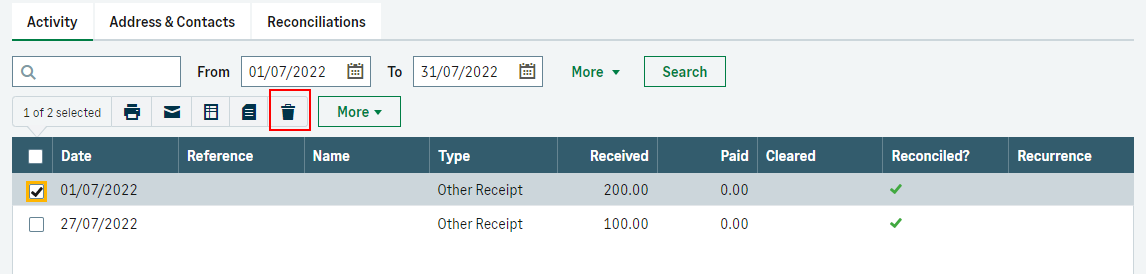
- From the toolbar, select the Delete
 icon.
icon.
If you find you are getting duplicate transactions from your bank feed which is not related to transfers between bank accounts, please use our bank feed escalation form so we can look into further.
Reverse transactions included on a submitted VAT Return
You can't delete a transaction included on a submitted VAT Return.
You will need to create a reverse transaction to clear the value from the bank account.
Read more about how to edit or delete transactions included on a VAT Return.
Solution Properties
- Solution ID
- 222001000100065
- Last Modified Date
- Fri Mar 22 12:26:35 UTC 2024
- Views
- 0